For property developers · Morocco
Run your lots, your clients and your property sales from one place.
Replace the Excel files and the WhatsApp groups with a price grid that is always current for every project, together with the reservations, the clients and what your sales team did.
Free demonstration · On your own lots · 3 team roles
No more Excel files going round on WhatsApp.
This is not a discipline problem. It is a tooling problem: a spreadsheet was never able to say who holds the right version.
Excel
Several versions of the grid are in circulation at once, and nobody knows which one carries today's prices.
The information scatters between sales, managers and management, one message at a time, across three different threads.
No trail
Who changed that price? Who reserved that lot, and when? The answer exists nowhere.
With promote.ma
One source of truth for your whole team.
One lot, one price, one status, one client. What the salesperson sees at the sales office is what management sees the same evening.
The grid
Your price grid, always current
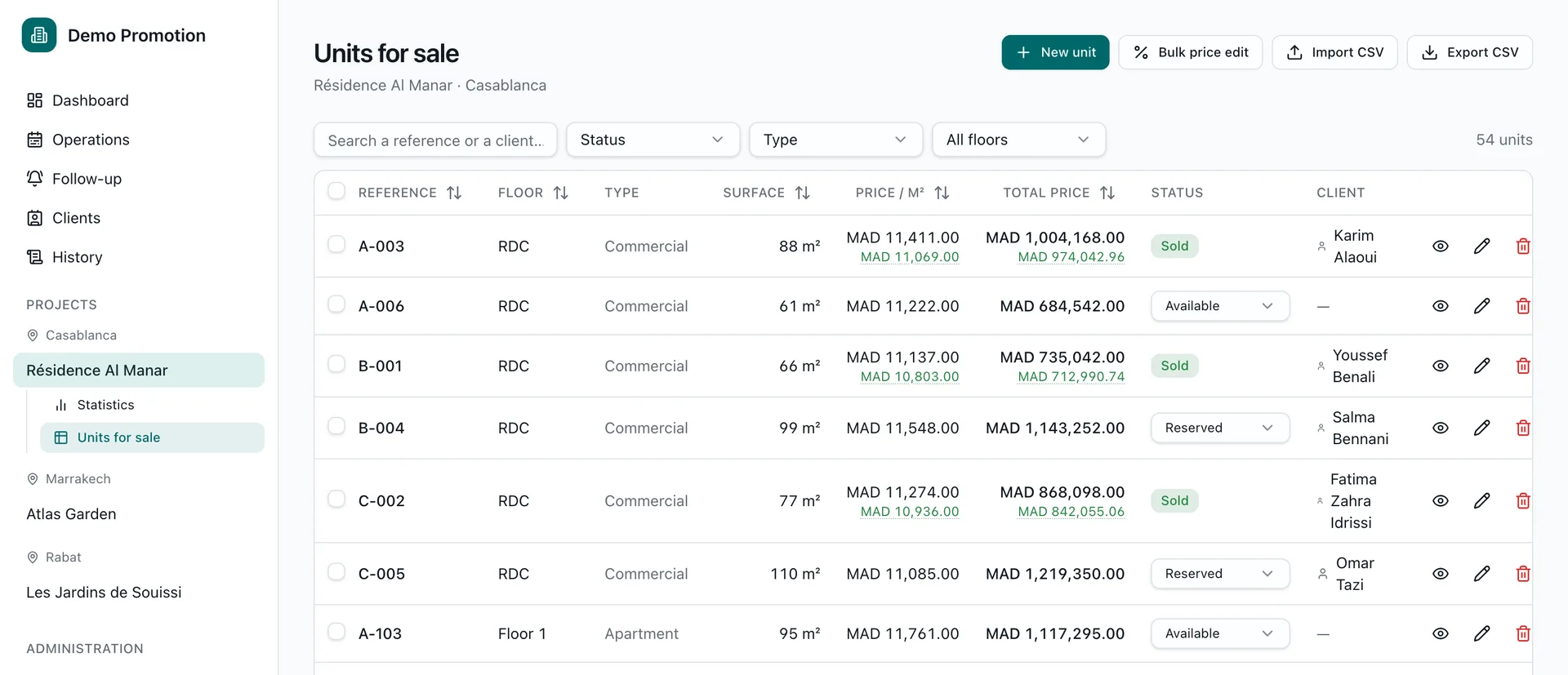
Every lot in one table: reference, floor, type, area, price per m², total price, status and client. Filter, sort, search. A manager re-prices a whole grid in one operation, imports yours from a CSV, and exports it when it has to be passed on.
- Under every listed price, the price actually agreed
- CSV import and export of your existing grid
- Filters by status, type and floor
The reservation
A complete reservation in a few clicks
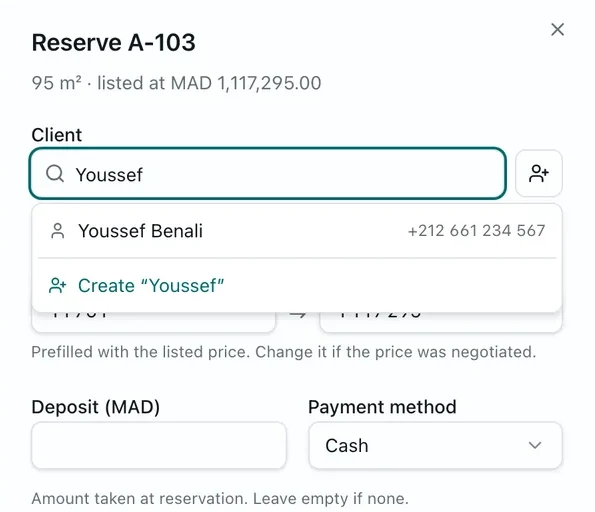
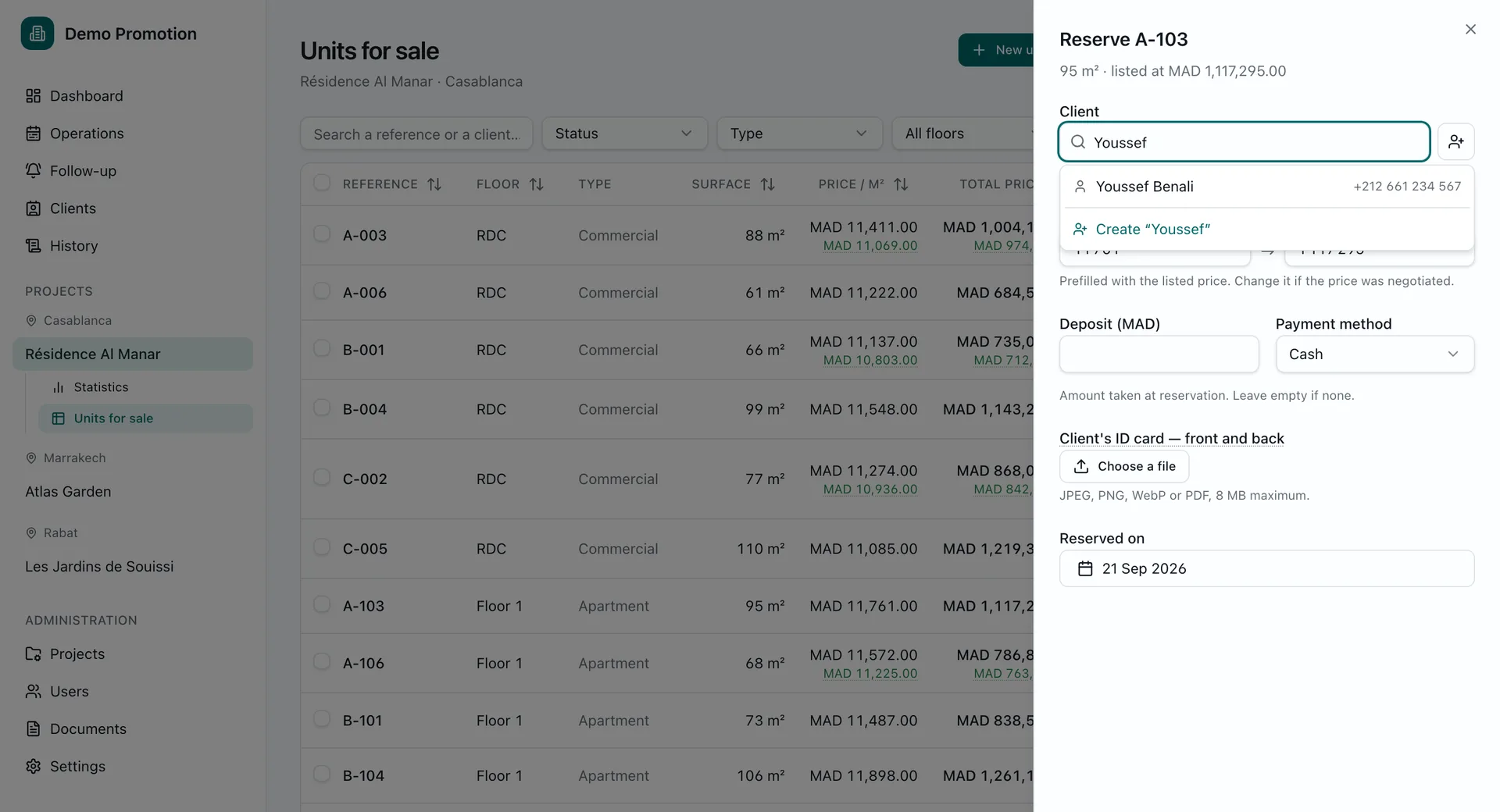
The client is found or created in the same place: type a name and the last row creates it. The agreed price is prefilled with the listed one and shows the gap while you change it. The deposit, how it was paid, the ID card front and back, and the date follow. One submit, one write, one line in the log.
- Existing or new client, without leaving the sheet
- Deposit, payment method and attachments
- The lot's status flips at the same moment
The file
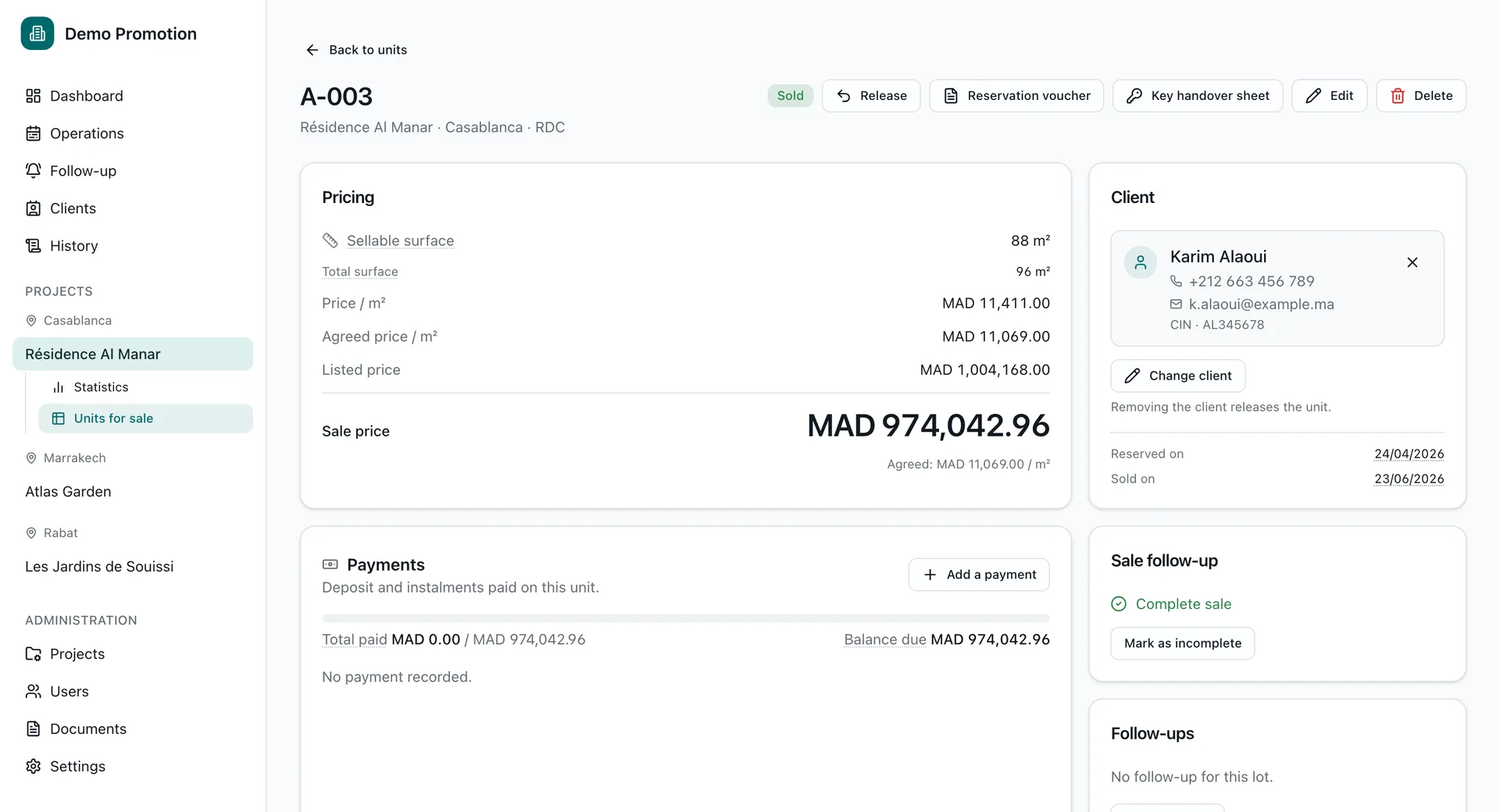
Every sale, every payment, every document
Listed price, agreed price per m², sale price. The client and their details, with the reservation date and the sale date. The payments and what is left to pay. The follow-ups. And the paperwork: ID card, notary contract, cheque, signed handover form. Nothing lives anywhere else.
- Successive payments and the balance due
- Follow-ups attached to the lot, not to a sticky note
- Attachments kept with the file
History
Every change leaves a trace.
Any action that changes something is recorded: who, when, from which IP address, and exactly what changed, old value and new. The log is append-only, refused on update and delete by the database itself: an administrator of the software cannot erase their own trace. Exports are in there too, because taking the whole grid out is precisely the action you want attributable afterwards.
- Who, when, and from which IP address
- Old value and new value, side by side
- Append-only, enforced by the database
- Grid exports are recorded as well
From the log
- Karim T.Price changedMNR-4051,980,000 → 2,040,000 MADToday · 14:32
- Youssef B.Lot reservedMNR-304Deposit: 50,000 MADToday · 14:18
- Salma R.Grid exportedRésidence Al Manar142 lotsToday · 13:52
- Nadia E.Access deniedProjet Yasmine41.248.x.xYesterday · 18:07
Roles
Everyone on your team sees what they need.
Three roles, from the narrowest to the widest. A salesperson sees only the projects assigned to them: no greyed-out tab, the other projects simply do not exist in their screens.
Sales
1/3Their projects, and nothing else.
- The projects assigned to them
- Reservations and holds
- Clients and follow-ups
- Sales and payments
Manager
2/3The whole commercial operation.
- Every project
- Prices and grid re-pricing
- CSV import and export
- Sales accounts
Administrator
3/3Everything, accounts included.
- Every project, create and delete
- Every user
- Settings and logo
- The full history
The detail, row by row
| Capability | Sales | Manager | Admin |
|---|---|---|---|
| See projects | Those assigned | All | All |
| Reserve, sell, attach a client | Yes | Yes | Yes |
| Re-price a grid, import a CSV | No | Yes | Yes |
| Create and edit projects | No | Yes | Yes |
| Delete a project | No | No | Yes |
| Create accounts, reset a password | No | Sales accounts | Everyone |
| Organisation settings and logo | No | No | Yes |
Every row is enforced on the server, not merely hidden in the screen, and a test suite calls each path directly to check it.
Before / after
The same working day, without the hunt for information.
Before
- An Excel file
- Sent on WhatsApp
- Corrected over the phone
- Sent back in a private message
- Three versions in circulation
- One lot promised twice
With promote.ma
- Prices
- Statuses
- Reservations
- Follow-ups
- Payments
- Documents
And underneath all of it, the history: who did what, and when.
- 3
- team roles, enforced on the server
- 100%
- of changes written to the log
- CSV
- import and export of your existing grid
- FR · EN
- two languages, amounts in dirhams
Overview
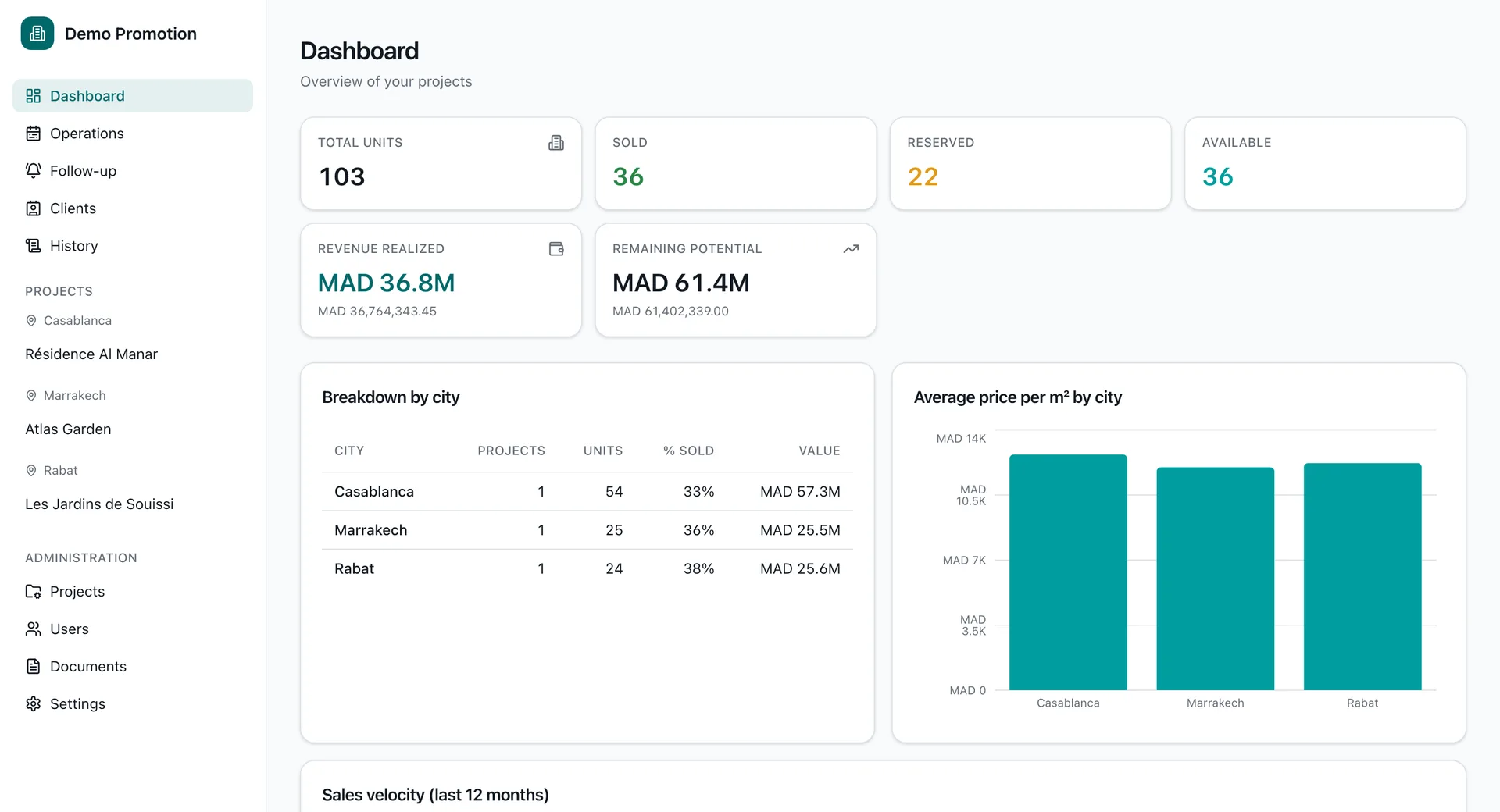
One dashboard for all your real estate projects
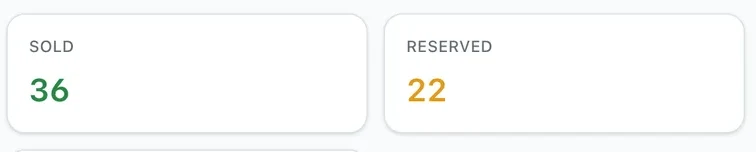
Lots sold, reserved, available. Revenue booked and potential remaining, to the dirham under the rounded figure. Breakdown by city, average price per m², and the sales pace of the last twelve months. A salesperson sees their projects, a manager sees them all.
Your next price grid could be in here.
Send us the Excel file you use today. We will show you, free of charge, how your project would work inside promote.ma.
No installation · Demonstration on your own project · Answer within one working day.
Three accounts are waiting on the sign-in screen (admin, manager and sales) so you can see the same projects from three angles. The data is reset every night: reserve, sell, change prices, nothing you do sticks.